
Skip to navigation Skip to content
  • Facebook
  • Twitter
  • Instagram

Your local Computer Shop, IT Support and Networking specialists

  • Home
  • Visit Our Shop
    • Visit Us
    • New PCs & Laptops
    • Custom Built PCs
    • Refurbished PCs & Laptops
  • Services
    • PC & Laptop Pepairs
    • Computer Repair Collection & Return
    • Business IT Support
    • Computer & Laptop Upgrades
    • Virus & Malware Removal
    • Phone & Tablet Repairs
    • Internet, WiFi & Networking
    • Caravan Wifi Installation
    • Home & Business Callouts
    • Data Backup, Recovery & Wiping
    • VHS to DVD & Digital Transfer
  • Online Shop
    • Browse Products
    • Refurbished Computers, Laptops & More
    • Cart
  • Blog
  • Track Your Repair
  • Contact Us
Call us
01754 611720
Call Us (Shop hours)
Room 4, Albert Road Business Centre
Albert Road, Skegness
Lincolnshire, PE25 3RB
What3words: speaking.elbowed.clef
Mon-Fri 10:00-17:00
Saturday - 09:30-12.00
Advise calling before visiting

Your local Computer Shop, IT Support and Networking specialists

Call us
01754 611720
Call Us (Shop hours)
Room 4, Albert Road Business Centre
Albert Road, Skegness
Lincolnshire, PE25 3RB
What3words: speaking.elbowed.clef
Mon-Fri 10:00-17:00
Saturday - 09:30-12.00
Advise calling before visiting
  • Home
  • Visit Our Shop
    • Visit Us
    • New PCs & Laptops
    • Custom Built PCs
    • Refurbished PCs & Laptops
  • Services
    • PC & Laptop Pepairs
    • Computer Repair Collection & Return
    • Business IT Support
    • Computer & Laptop Upgrades
    • Virus & Malware Removal
    • Phone & Tablet Repairs
    • Internet, WiFi & Networking
    • Caravan Wifi Installation
    • Home & Business Callouts
    • Data Backup, Recovery & Wiping
    • VHS to DVD & Digital Transfer
  • Online Shop
    • Browse Products
    • Refurbished Computers, Laptops & More
    • Cart
  • Blog
  • Track Your Repair
  • Contact Us

Blog

21 Mar
Category: User advice
Posted by gav

Logging with a local Windows account v’s Microsoft Account

What is the difference?

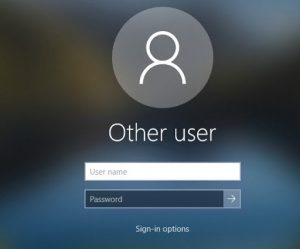
Ever since the introduction of Windows 8 onwards, Microsoft have made it harder to setup your machine to login in to Windows with a local account how you would have normally done so in previous versions of Windows. They would now rather you sign in with a registered Microsoft account, it may have its advantages but also many disadvantages too so you need to decide which is best for you.

A local account involves having a username and password specific to that particular device you are logging in to, whereas a Microsoft account involves being registered with Microsoft allowing you to also sign into other devices with the same account and synchronising with a range of Microsoft services such as One Drive etc.

Advantages/disadvantages of a local account?

With a local account, your username and password is specific to that device only therefore:

  • Potentially more secure as your chosen secure password is only for that device.
  • All your settings on that computer locally are only available on that machine and cannot be accessed by others.
  • An internet connection is not needed on that machine, the login information is only stored locally and not via Microsofts servers.
  • You can give your login name a custom name.

Advantages/disadvantages of a Microsoft account?

With a Microsoft account your login is validated by Microsoft’s servers and so:

  • Synchronise settings amongst other devices logged in with that same account such as desktop backgrounds, wifi passwords, browsing preferences etc.
  • Automatically sign in to Microsoft services such as One Drive, Microsoft Store, Skype, 365, Calendar, Mail.
  • A forgotten password can be recovered by using a separate device to go through the forgotten password recovery procedure on Microsoft’s website to reset the password and then sign in with the new password.

Which is best for me?

It cannot be said that one is better than the other however when installing or setting up a new user for Windows, Microsoft are tending to automatically point user into the direction of setting up to log in with a Microsoft account. This does not mean it is a better method though.

If you are a user with just a single machine, or one that has more than one but does not need to syncronise settings or users across them, or if there is need to for the various Microsoft services then a  local account with a strong password will usually suffice.

However if you need to use the same user and settings across several machines and want to automatically syncronise the various Microsoft services across them too, then logging in with a Microsoft account is preferred.

Password security and recovery?

The login password stored on a machine with a local account is only stored on that machine and cannot therefore be hacked without physical access to that machine, whereas passwords for a Microsoft account are stored on Microsoft servers and there is always the potential to remote hacking, although rare given the strong methods of sercurity these days. But none the less as they are stored away from the machine then there is always a slight chance they can be obtained by a third party without requiring physical access to the machine.

A very common problem we come across is users not remembering their passwords, very often for website logins and email accounts etc. Occassionally login passwords can be forgotten of either local accounts or Microsoft accounts.

It is possible to recover a Microsoft account password with access to the use of another device if forgotten. Passwords for local accounts can also be recovered too however these do require different techniques. We are able to help with either, please contact us for help if needed.

Tags: lost password, microsoft account, windows login, windows password
Share this post:

Recent Posts

  • Case Study – Improving Wi-Fi Across Two Buildings
  • My wifi does not cover my whole house, who is responsible?
  • Do I need an Omnidirectional or a Unidirectional 4g/5g Antenna?

Archives

  • November 2026
  • July 2026
  • March 2026
  • November 2025
  • September 2025
  • February 2025
  • December 2024
  • August 2024
  • January 2024
  • August 2023
  • April 2023
  • December 2022
  • November 2022
  • July 2022
  • February 2022
  • December 2021
  • October 2021
  • July 2021
  • June 2021
  • May 2021
  • March 2021
  • January 2021
  • October 2020
  • August 2020
  • June 2020
  • May 2020
  • April 2020
  • November 2019
  • September 2019
  • April 2019
  • January 2019
  • December 2018
  • July 2018
  • May 2018
  • April 2018
  • Facebook
  • Twitter
  • Instagram

QUICK LINKS

  • PC & Laptop Repairs
  • Track Your Repair
  • Online Shop
  • Internet, WiFi & Networking
  • Business IT Support
  • Visit Our Shop
  • Contact Us

Customer Reviews

Google
Google star 1Google star 2Google star 3Google star 4Google star 5
4.8
Top Rated Service 2026
verified by Trustindex
Trustindex verified that these reviews were published on Gavardos Digital's Google Business Profile. Learn more
 

Address

  • Gavardos Digital
    Room 4, Albert Road Business Centre
    Albert Road, Skegness, Lincs, PE25 3RB
  • Telephone: 01754 611720 (Landline)
    Emergency Only: 07398 542677
  • info@gavardos.co.uk
View our terms and conditions of business
View our online ordering terms and conditions of business
Delivery & Returns Information
View our privacy policy

Opening hours

  • Monday 10:00 - 17:00
  • Tuesday 10:00 - 17:00
  • Wednesday 10:00 - 17:00
  • Thursday 10:00 - 17:00
  • Friday 10:00 - 17:00
  • Saturday 09:30-12.00
  • Sunday Closed

We strongly recommend calling or messaging before visiting, as we may occasionally be out attending a customer callout.

© All content copyright Gavardos Digital Privacy Policy
Scroll to top