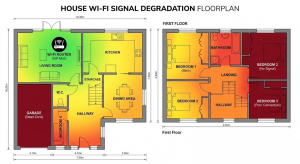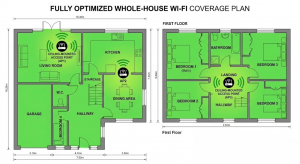

Why can I not get wifi in every room of my house?
This is a common question we get asked and there answer is, there are many factor involved including:
Router location – A more centralised location in a more open higher place will give better coverage than tucked away in a corner, in a cupboard or near other electronic devices or large metal objects.
Building materials – Certain materials such as stone and brick walls, concrete floors, steel beams and foil backed insulation will have lock signals much more than modern wooden stud walls.
House size and layout – Wifi is only designed to cover a certain area of which may not cover your whole house. This can also be complicated further by things such as long halls, multiple floors and L shaped layouts.
Distance from the router – Wifi signal always deteriorates over distance, therefore close to the router will always be stronger than those further away such as at the far end of a house.
Interference – Interference is often a problem, this is usually caused by factors such as neighbour’s networks and other household devices using the same frequencies such as wireless speakers, microwave ovens, baby monitors etc.
The wifi band you’re using – The most common bands are 2.4hz and 5ghz. 2.4ghz is better and travelling through walls and longer distances however it is slower and more prone to interference, whereas 5ghz is faster but has a shorter range and does’nt penetrate walls as well. Some routers support 6ghz which is faster than 5ghz but again has a shorter range.
Router quality and age – Some older routers may still work on wifi 4 and 5 standards with less powerful radios and lack the capacity for multiple devices. Wifi 6 and 6E routers are much more capable.
Number of connected devices – Even on strong signal connections, more devices attached to the network can cause congestion.
Device limitations – Although the router may be capable, the device that is being connected may not be as capable such as some phones and laptops only supporting older wifi standards or having weaker wifi hardware.
But my internet provider told me their router is the best there is yet it still won’t cover the whole property?
Routers supplied by internet providers are rarely of good quality in comparison to a good third party router. They are usually supplied for the low cost of them and the ability for them to troubleshoot remotely and provide very few features in comparison to a good quality third party router. Coverage is often weaker as is the ability to manage larger numbers of devices connected to it at the same time.
If you want better coverage from your router along with the ability to have more features such as VPN capabilities, VLAN support, better traffic control and more control over wifi channels and settings then we would always suggest using a third party router instead.
So is my internet provider responsible for me being able to get internet all the way through my house?
The simple answer to this is NO. All that the internet provider is responsible for is providing a reliable internet connect at the contracted speeds into your property. How you get that internet around to fully cover your property is your own responsibility.
The only exception is if you have bought a package from a provider that includes some kind of “whole home wifi guarantee” or similar where they guarantee to be able to provider coverage throughout your home.
There are two things to bear in mind with this however:
- This usually includes them supplying extra wifi devices to boost the signal around the house, although these usually cost an extra monthly payment on top of your normal subscription of which you have to return at the end of your contract.
- This guarantee does not guarantee full speed all over the house, they merely promise a connection in each room. Due to the nature of the devices and wifi, they may carry a signal throughout house however there will often still be weaker spots than others.
Which is the best option for me?
That leaves two main options available to improving the signal around your house:
- Use the internet provider’s solution if they have one, however the only solution they usually provide are wireless repeaters which are limited in performance and often do not solve the problem or trying to get wifi through solid walls. You do not own the equipment at the end of the contract either so for your next internet provider you would have to come up with a new solution again.
- Purchase and your own solution with a wider range of equipment types available of which can then be installed and left in your home permanently and is always available to be used no matter who your next internet provider is.
All homes are different with regards to size, structure and interference so therefore to get the best coverage available then a bespoke solution is the best way forward.
There are many difference pieces of equipment available depending on your budgets and requirements including hardwiring solutions, access points, mesh systems, extenders and powerline networking.
Where speed and reliability is important and there are seriously limitations such as think walls that wifi struggles to penetrate then we encourage the use of hardwired access points. Such systems can also be extended to provide coverage to your outdoor areas too and also other standalone buildings within your premises.
We can supply and install all systems and we offer a free survey and assessment for both private homes and businesses. To book or for any advice on the best solution for you please do not hesitate to contact us.
We always stock a range of different networking hardware in our Skegness computer shop.